Results You Can Trust
Two web apps for the 2024 election: one for PICs at the polling station, one for the party staff watching results come in.
One five-minute action, done once every five years, that has to be trusted
The project is really two web apps working together, built for the 2024 Indonesian election: a mobile web app that PICs open in their phone's browser on election day to report vote counts (Form C1, now officially called C.Hasil), and a web dashboard that regional party staff (DPW) use to set everything up beforehand and watch results come in. I designed both, from start to finish.
The hard part was never the screens themselves. It was making sure a five-minute action, done once every five years by someone who has often never used the app before, could still be trusted at the scale of thousands of polling stations. That trust only works if the admin side is set up properly ahead of time, with every PIC matched to the right polling station weeks in advance.
This case study explains the problem the way I saw it: first as a question of trust and how the two apps work together, and only after that as a question of screens and buttons.
Not a form. A pipeline the party makes decisions with on election night.
Official vote counting in Indonesia is slow. It takes days before results are fully verified and confirmed nationally. A party that wants to know what's happening on election night needs its own faster way of finding out, straight from PICs at each polling station, right after the local count finishes.
That makes this a two-way pipeline the party uses to make real decisions that night, like where to send legal help or where to expect problems. The PIC web app is where the information comes in, and the admin dashboard is where it's set up and watched. If either side breaks down, the party ends up trusting numbers it shouldn't, which is worse than having no numbers at all.
Make it hard to send something the party shouldn't trust, without making it hard for a nervous first-time PIC to send something they should.
On the admin side, the goal was to make it obvious, weeks ahead of time, exactly where the setup was still incomplete.
Constraints
- Only one shotThe PIC web app goes live once, on election day, for thousands of people at the same time. No trial run and no fixing it midway.
- First-time users, every timeIndonesia holds its general election once every five years, so that's how often PICs use this. Almost nobody remembers how it works, and many have never used anything like it.
- Very different comfort levelsSome PICs are young and used to apps. Others are older and may find this one of the harder apps they've used.
- Used standing upPICs use the web app in a crowded polling station, sometimes with a bad signal, with people waiting for them.
- A different user on the admin sideDPW staff use their dashboard many times over several weeks, at a desk. Their challenge is a lot of repetitive work, not first-time nerves.
- Real consequencesThe data is tied to an actual election result. Mistakes and bad intent both matter, on both sides of the system.
- Small team, no safety netThere was no dedicated technical team or testing process, so most of the trust-building had to be designed directly into both apps.
Five principles
- 1
Put the strongest check exactly where cheating is most likely, and nowhere else
The biggest risk is someone submitting a result without being at the polling station. So there's one strict, unavoidable step for that, confirming you're there, instead of small checks everywhere that would slow everyone down.
- 2
Make status clear in three seconds or less
A PIC glancing at their phone needs to know instantly what's done and what isn't, across three elections at once. A DPW staff member scanning a long list of regions needs the same. If it takes longer than a glance, the screen isn't doing its job.
- 3
Only add extra steps where they really matter
The warning before sending a photo and the confirmation before deleting one get an extra step on purpose, because getting them wrong matters. Everywhere else, the goal was as few taps as possible.
- 4
Always design for someone using it for the very first time
Almost nobody uses the PIC web app regularly, so I never assumed people would remember how it works. Every screen had to make sense to someone doing this for the first time, under pressure, with no one to ask.
- 5
Do the hard work early, so election day can be simple
The PIC web app can stay simple only because the admin dashboard handles the complicated part beforehand. Every polling station and every PIC is set up and checked before election day, so nothing is left for the field to figure out.
Two halves of one system
The PIC Web App
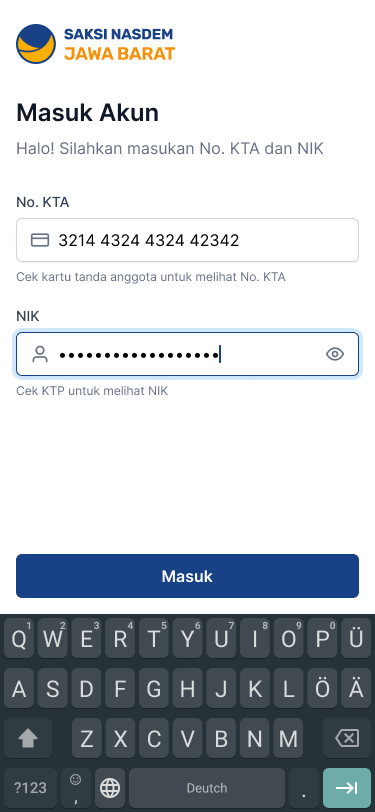
Mobile browser · election dayPICs log in with their party membership number (No. KTA) and national ID number (NIK), not an email or phone number. Only real, registered party members can get in, without a separate sign-up step slowing things down on election day.
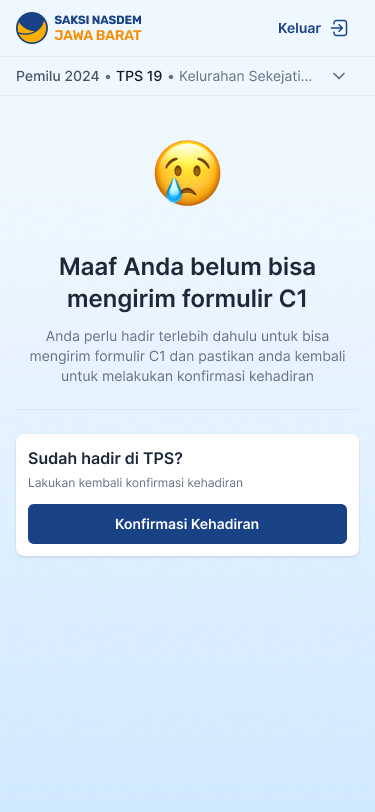
Before sending any results, a PIC has to confirm they're actually at the polling station. Until they do, every submit button stays locked and a screen explains why. This is the first line of defense against fake or early submissions.
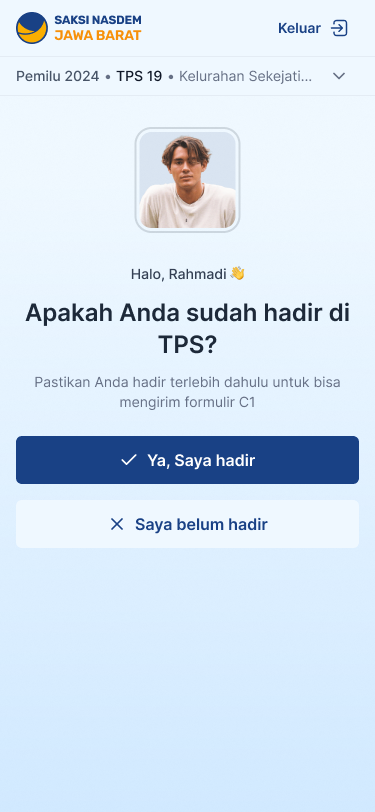
- First, one question: "Are you at the TPS?" Nothing else is reachable yet.
- Not yet? Every submit path stays locked, and the screen says why and how to unlock it.
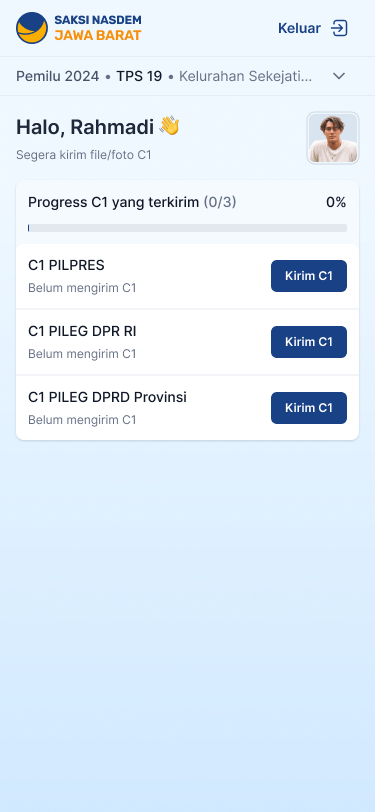
- Confirmed. The home screen opens and each election's C1 can be sent.
Interactive prototype · try both answers
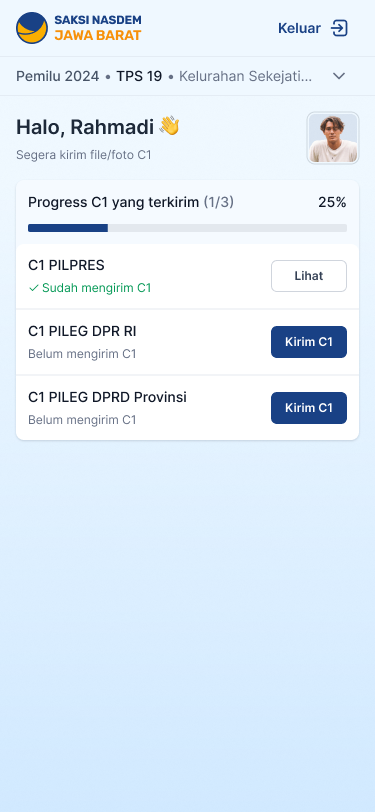
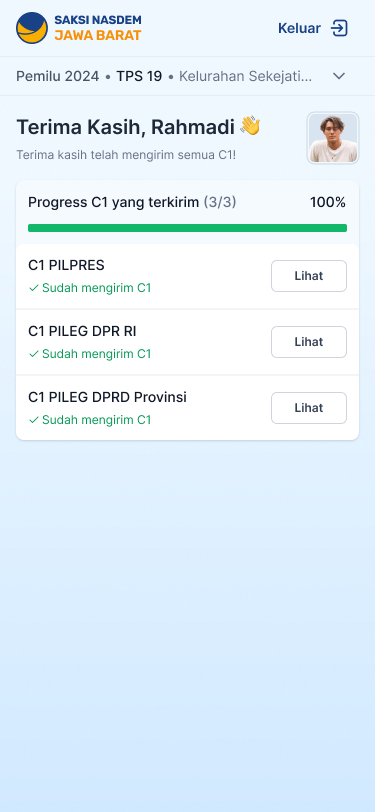
The home screen shows how many results have been sent ("0 of 3") across all three elections, each with a short status and a button to act on it right away. The checklist style makes it obvious what's left, even on first use. Each election that's been sent gets a green tick and its button changes from Kirim C1 to Lihat (view), and once all three are in, the bar turns green and the greeting says thank you.
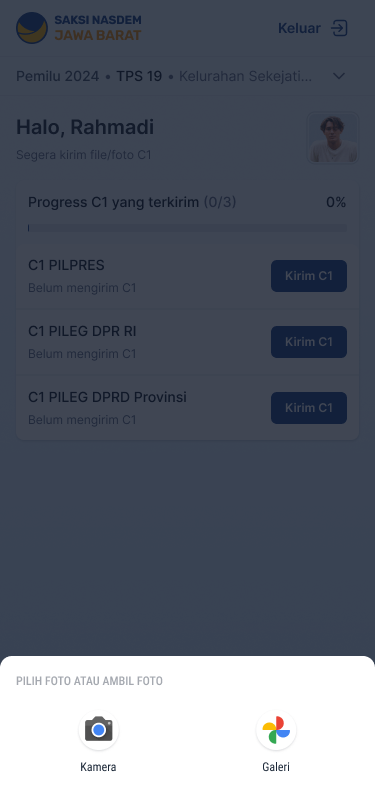
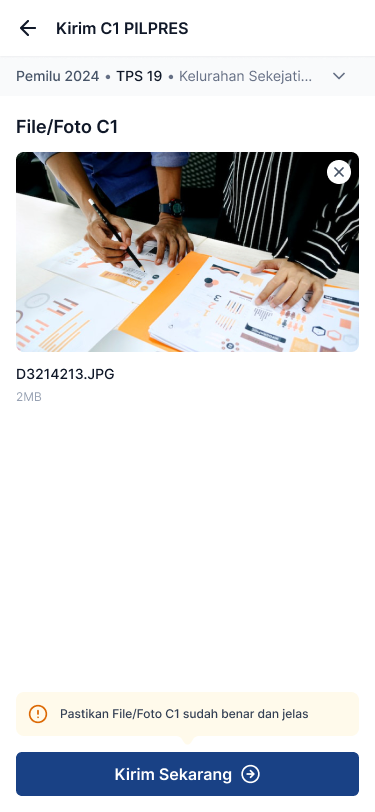
The photo is of the signed A4 summary sheet (C.Hasil) that each party's witness receives at the polling station, not the large Plano sheet on the wall. PICs take the photo directly or choose one from their gallery, then preview it. Right before the Submit button, a clear warning reminds them to check the photo is sharp and readable, catching a blurry form before it's too late to fix.
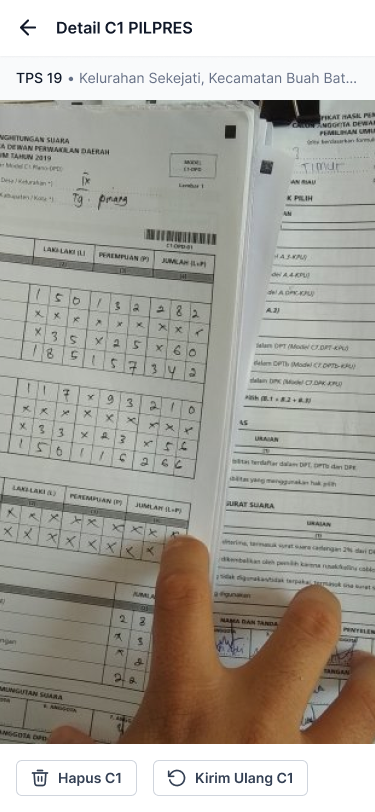
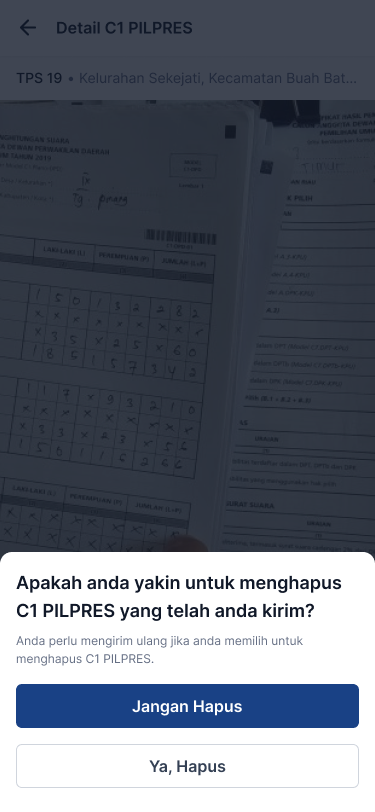
After sending, a PIC can view what they sent and either delete it or send it again. Deleting always asks for confirmation with a clear warning ("you'll need to resend if you delete this"), so something this important can't be erased by accident.
None of the PIC experience works unless someone sets it up first: deciding which polling stations exist and which PIC is assigned to each one.
The Admin Dashboard
Web · weeks before and on the nightAdmins log in with a username and password instead of an ID number. That difference is deliberate: this account can see and change information for the whole province, not just submit one person's result.
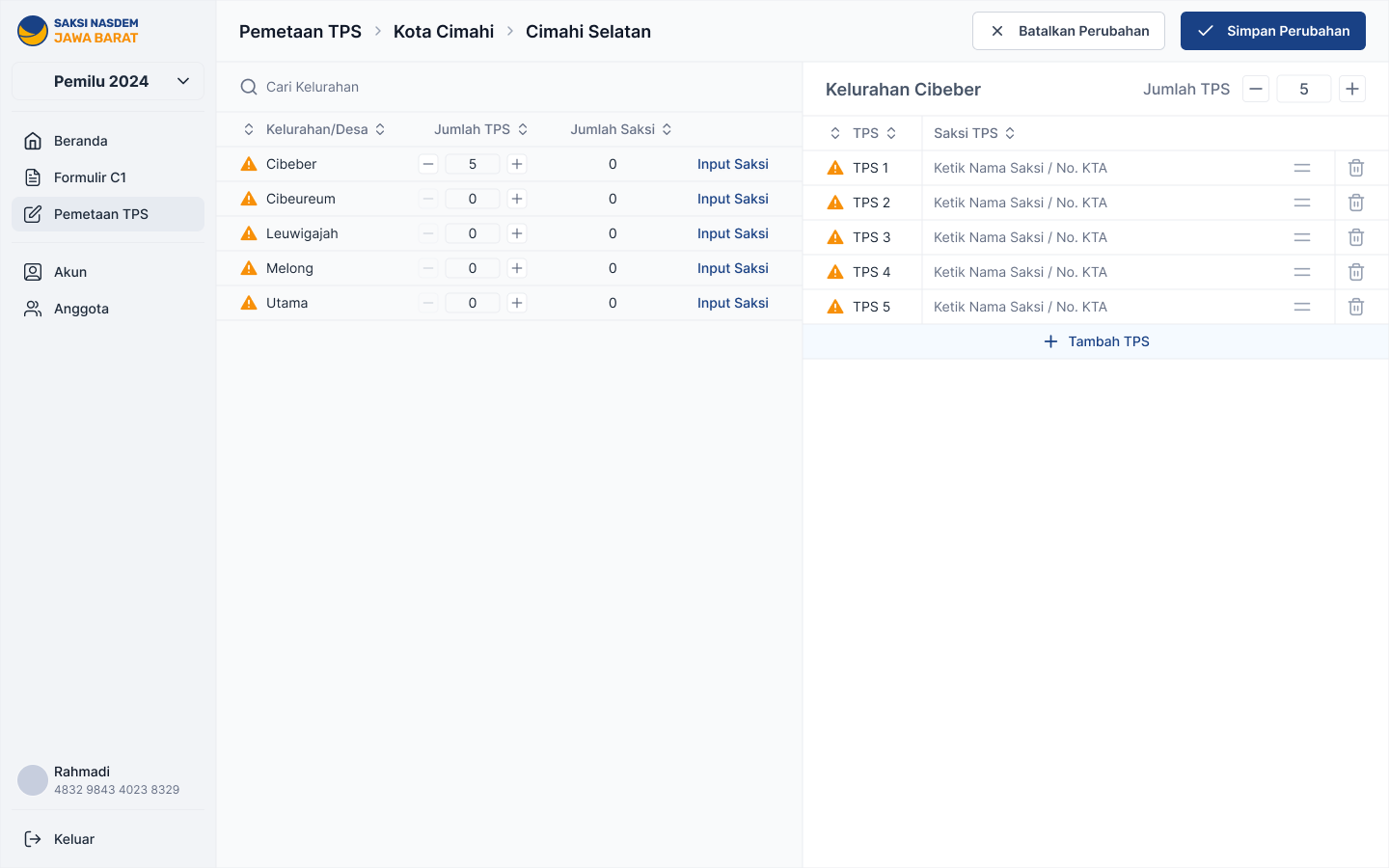
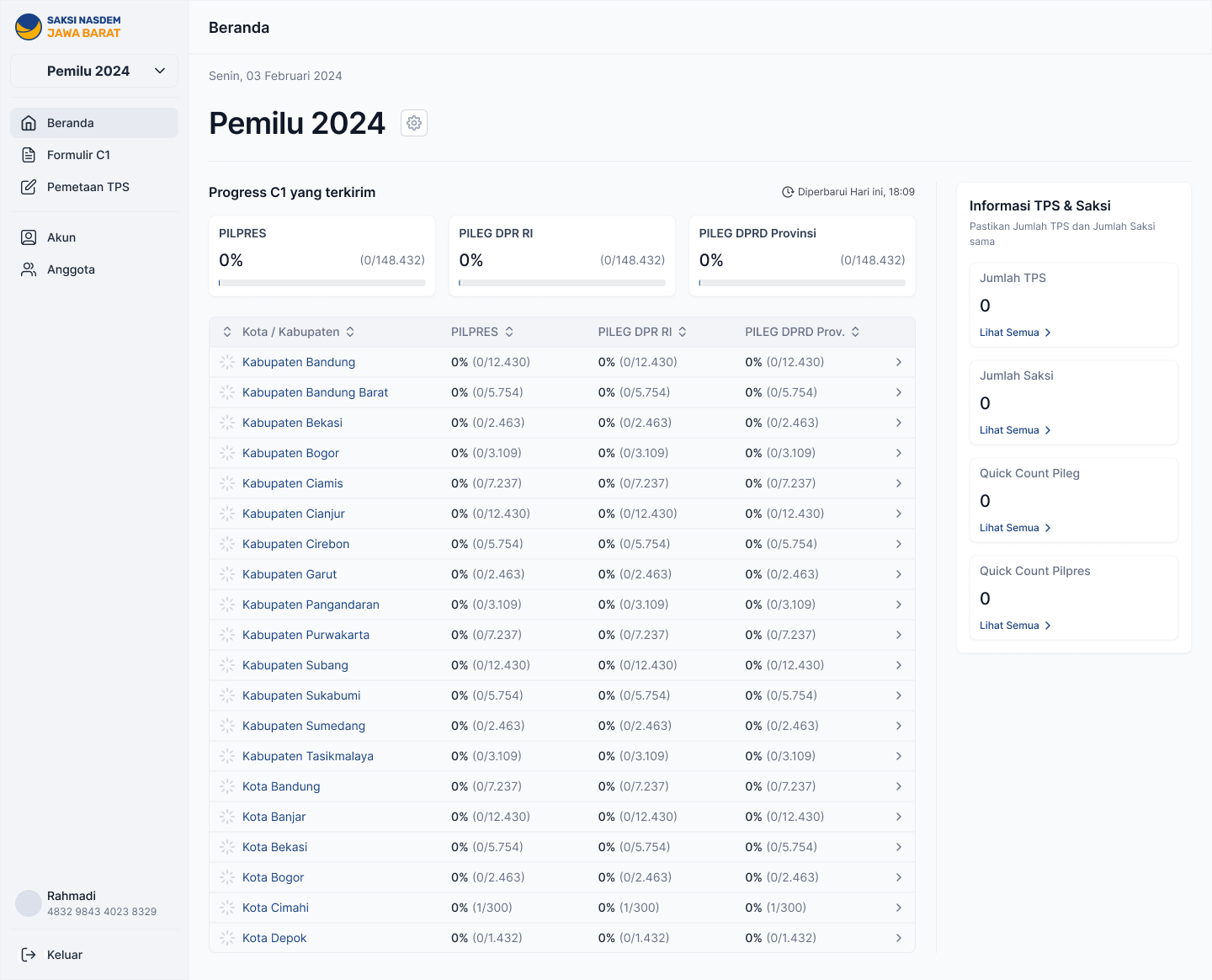
Before any PIC can log in and confirm they're present, an admin sets how many polling stations exist in each village area and assigns a PIC to each one. A small warning icon appears next to any area that isn't fully set up, turning an easy-to-miss gap into something impossible to overlook while there's still time to fix it. This step quietly decides whether the PIC-side check will work.
Once polling stations open, the dashboard rolls up progress across all of West Java, broken down by city and regency, for all three elections side by side, with the option to drill into any region. A side panel keeps the key setup numbers (total polling stations, total PICs) one click away, along with early vote-count figures.
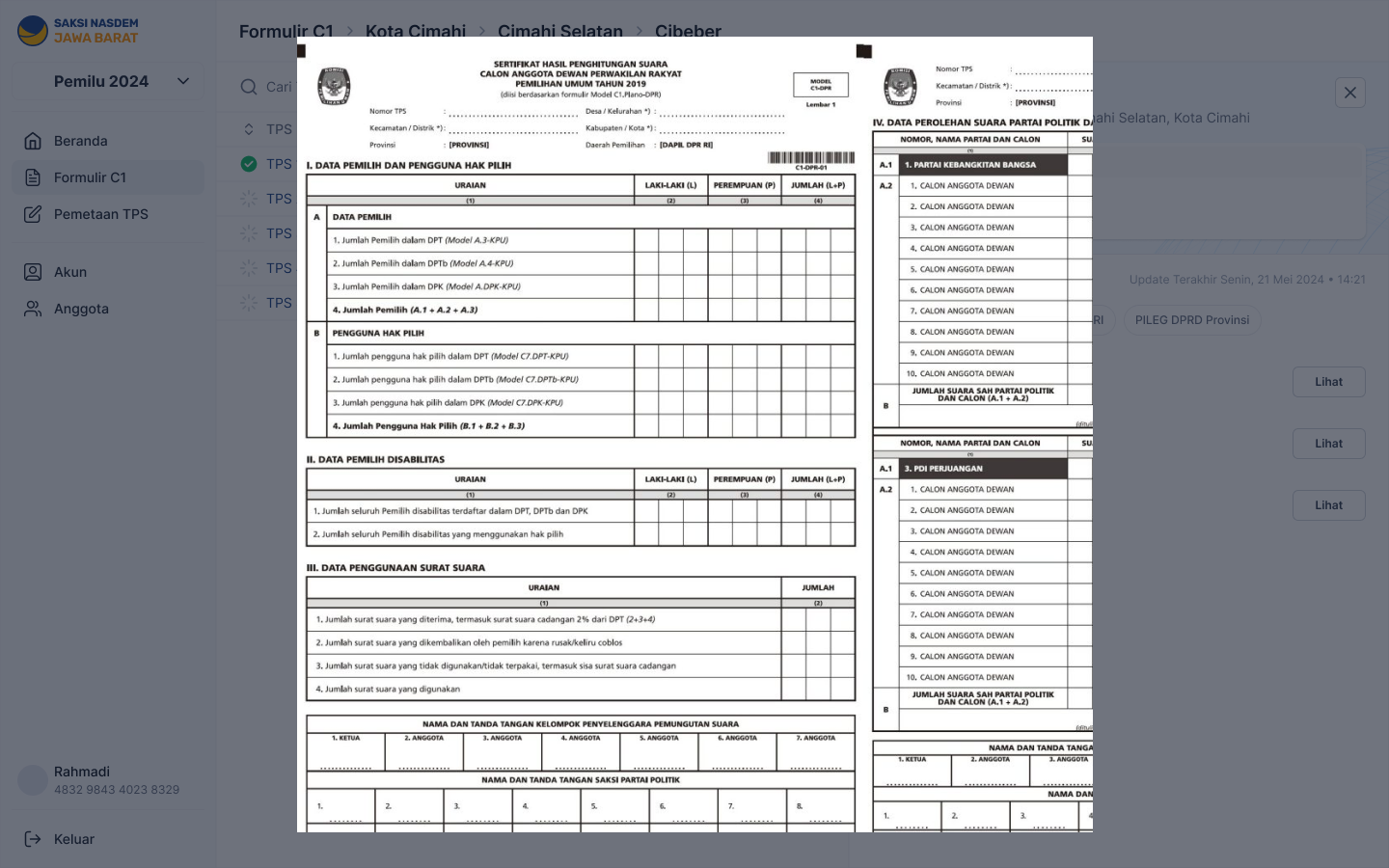
The same region-by-region browsing, but for the actual submitted photos rather than a completion percentage, so DPW staff can check specific results instead of trusting a summary number.
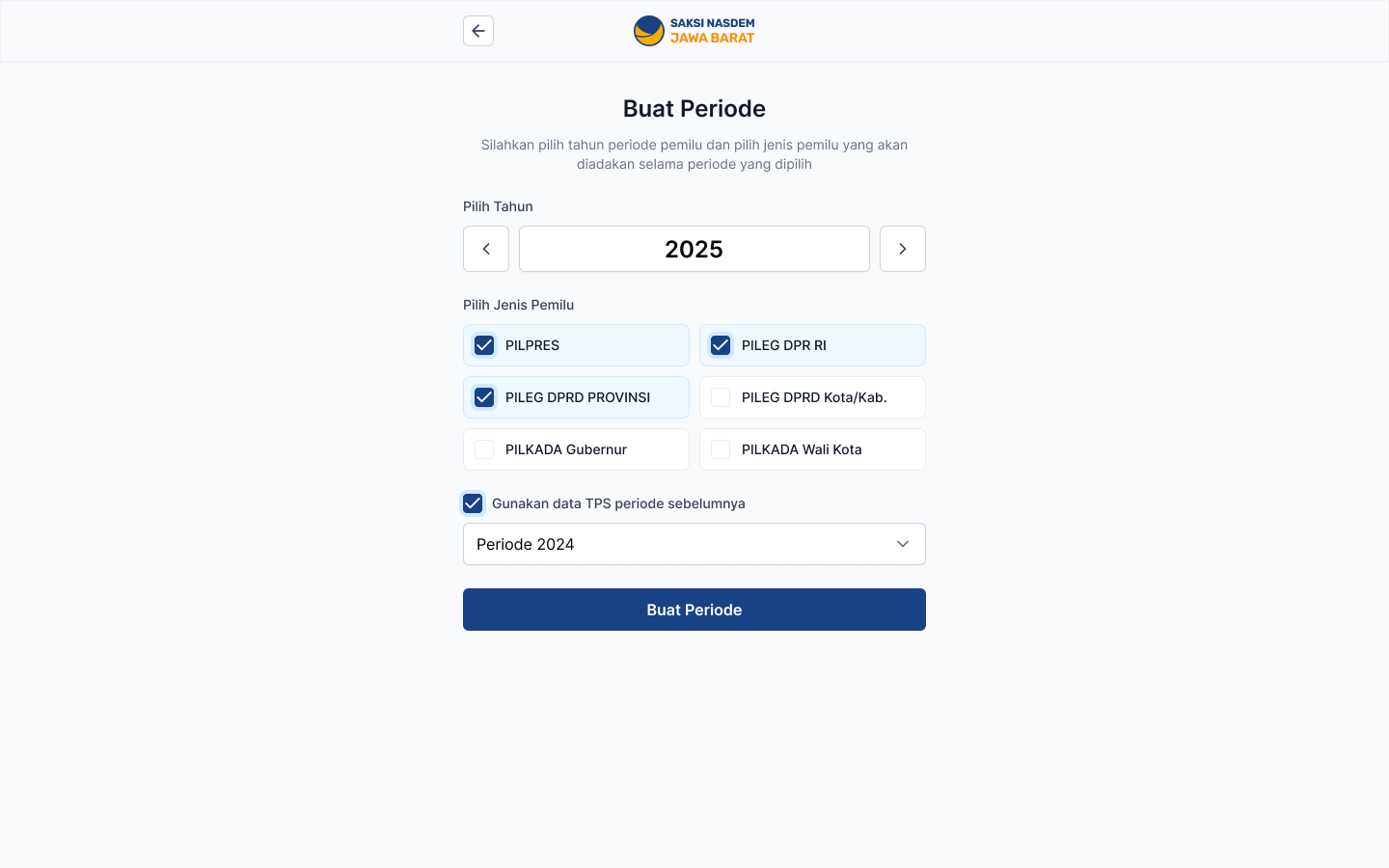
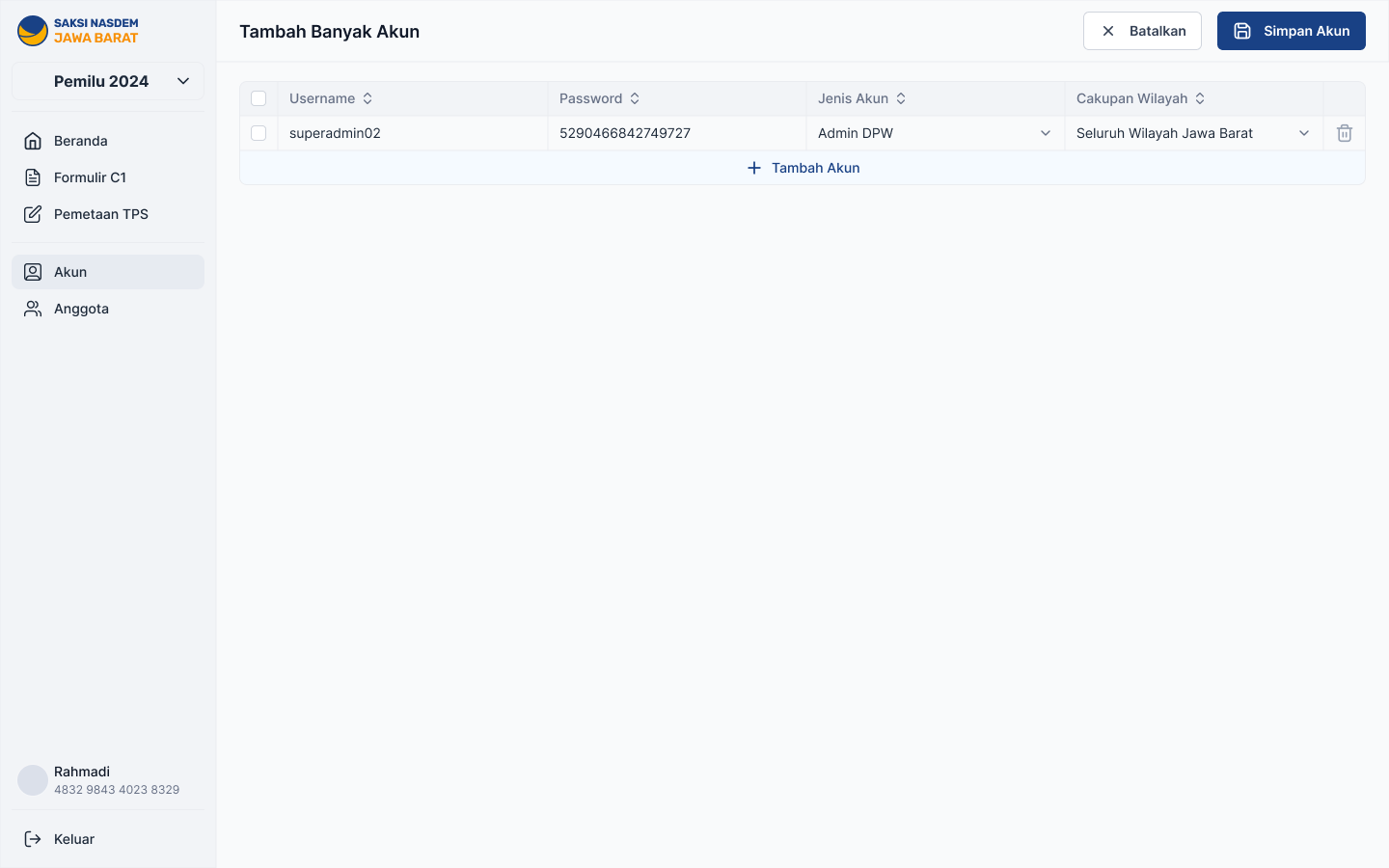
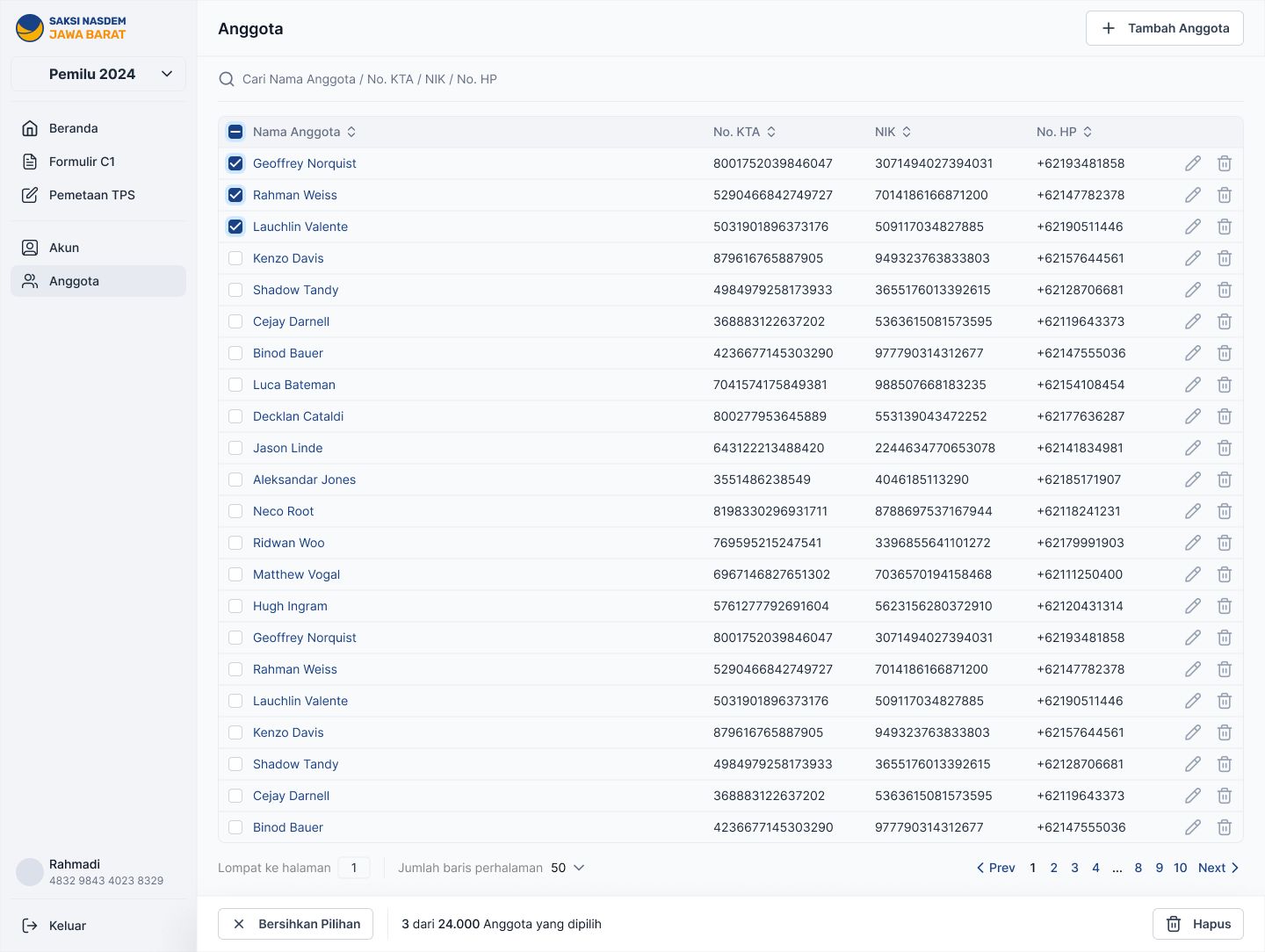
Starting a new election cycle, managing the admin's own account, and keeping the list of party members who can be assigned as PICs. This is the groundwork that has to exist before any polling station can be set up.
What I'd do differently with more time
Part of a good design review is talking about the paths not taken. These are the choices I'd stand behind, and what I'd argue for if this became a long-term product instead of a one-night event.
| Decision point | What I chose, and why | What I'd revisit |
|---|---|---|
| How PICs prove who they are | Membership number + national ID, no extra verification. Faster on election day, but weaker against someone faking an identity. | For a national version, a lightweight extra check, like recognizing the same phone on return visits, without adding a login step. |
| Making sure photos are readable | A warning before sending, no automatic check. The fastest option given the timeline. | Automatic detection of blurry or glared photos, so the warning becomes a real check instead of a reminder. |
| Fixing a submitted result | Simple delete-then-resend with a confirmation step. Easy to use, but the original submission disappears completely. | Keep every version and make it visible, instead of losing the first one when it's deleted. |
| Setting up polling stations | Manual, one-by-one setup, giving admin staff full visibility while they learn an unfamiliar dataset. | Bulk upload from a spreadsheet, since doing this one village at a time doesn't scale to a full province. |
| Admin permissions | One admin role with access to the whole province, given the timeline. | Limited, region-specific access, so a local coordinator isn't handed control over the whole province. |
Five risks shaped most of both apps
| Risk | Mitigation designed into the flow |
|---|---|
| Someone submits a result without being at the polling station | A required "confirm you're here" step blocks every path to submitting. It's the one non-negotiable step in the whole app. |
| A blurry or unreadable photo gets submitted unnoticed | A clear warning right before sending, flagged in the trade-offs as worth strengthening. |
| A submitted result is deleted by accident or on purpose | A confirmation step spells out the consequence in plain words and requires sending again. Deleting is never a single tap. |
| A nervous first-time user gives up partway under time pressure | Simple one-step-at-a-time screens and a checklist home screen, so there's nothing to remember or figure out. |
| Polling stations aren't fully set up before election day | A warning icon on any incomplete area, visible to admin staff while there's still time to fix it. |
Next time: pay PICs once their C1 is verified
If we get the chance to build this again for the next election, I'd propose connecting the PIC web app to a payment gateway. A PIC would be paid once an admin has checked their C1 photo on the dashboard, so reviewing a result and paying for it become one flow.
- The PIC sends their C1 photo from the web app, exactly as today.
- An admin reviews it in Formulir C1 on the dashboard and marks it as verified.
- Verification triggers the payment through the payment gateway.
- The PIC sees the status in the web app: waiting for review, verified, then paid.
Pay for what the party actually needs: a readable, verified C1, sent on time.
- A reason to get it rightTying payment to a verified photo gives PICs a clear, personal reason to send a sharp photo, on time.
- One review, two jobsChecking a C1 and releasing the payment happen in the same step on the admin dashboard.
- Rejected photos need a clear pathIf a photo can't be verified, the PIC needs to know why and be able to resend it before payment, not after.
- Payment details belong in setupWhere each PIC gets paid should be collected weeks ahead, alongside PIC mapping, not on election day.
What I'd want to measure
I don't have real field numbers to share yet. Rather than invent any, here is what I planned to measure.
- Time from local count to submission. The core speed this whole app exists to improve.
- Resend rate. A sign of how many photos failed the quality check the first time.
- Drop-off at "confirm you're here". To check whether the step was blocking the right people.
- Share of polling stations reporting on time. The number that matters most to the party.
- Share of villages fully set up before election day. An early warning for how many problems to expect later.
Where to spend a limited amount of trust
Most interesting design problems eventually stop being about layout and become about deciding where to spend your limited trust-building effort. This project only had room for a few strict rules, so the real work was finding the few moments that truly needed one and keeping everything else out of the way.
Designing both apps together made that possible. The PIC web app's "confirm you're here" step only works because the admin setup behind it is solid. I wouldn't have seen that connection as clearly if I'd designed one side and handed the other to someone else. A limitation on one side is usually the actual design brief for the other.
The honest limitation is that most of this trust-building still depends on people doing the right thing: a warning message, a confirmation step, a warning icon in a table. None of that is a real audit system. It was the right call for a small, one-time build, and it's exactly what I'd replace first if this became a permanent tool.
Liked this one? Let's talk.
If you're working on something where this kind of thinking would help, I'd love to hear about it.