The Referral Nudge
A small nudge that walks people to an entry point they couldn't find.
The entry point existed. People just couldn't find it.
Jago Referral lets customers invite friends and earn a bonus for each friend who joins. For the bank, it is one of the more important channels for bringing in new customers. But the referral entry point lived in the Shortcut section, further down the home screen, and many users had trouble finding it.
Rather than redesigning the home screen or moving the entry point, I designed a small floating nudge. One tap scrolls the screen to the Shortcut section and highlights Jago Referral, so people learn where it lives. The nudge shows up once, then gets out of the way.
It's a small change, but it had a fairly big impact. And because the nudge isn't tied to referral, the same component can point people to any product or feature we want to highlight.
An important feature, below the fold
The home screen has a lot to do. Balance, transfers, QRIS, Spotlight, scheduled payments and shortcuts all compete for the same space, and most people only see the top of it. Jago Referral sat in the Shortcut section, out of view when the app opens.
The result was predictable: many users had trouble finding the referral entry point, even though the program is one of the bank's important tools for acquiring new customers. Every customer who wanted to invite a friend but couldn't find where to do it was a missed new customer.
Don't move the entry point. Walk people to it, once.
Moving referral higher up the home screen would push something else down, and the same problem would come back for the next feature. What was needed was a way to point at something without changing where it lives.
Tap, scroll, highlight
A purple floating nudge sits just above the bottom navigation: "Invite friends, earn bonus ↓". The arrow says where it leads before anyone taps. Try it below.
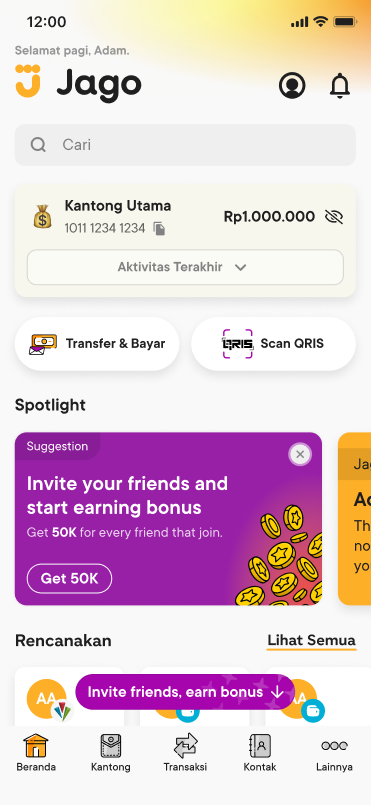
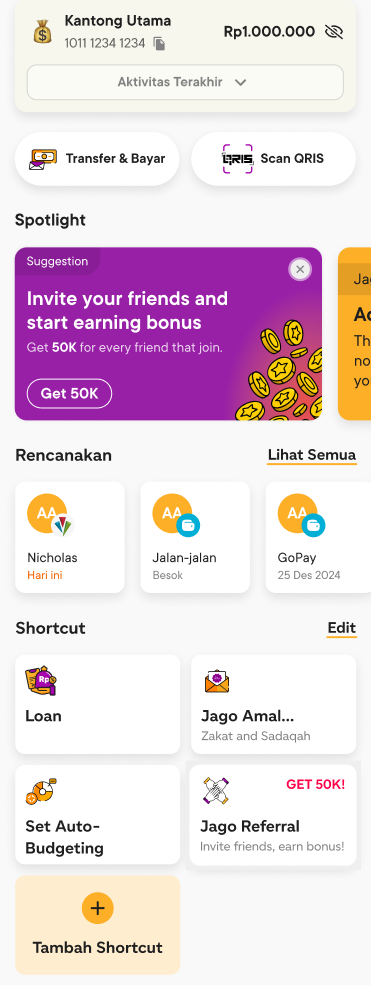
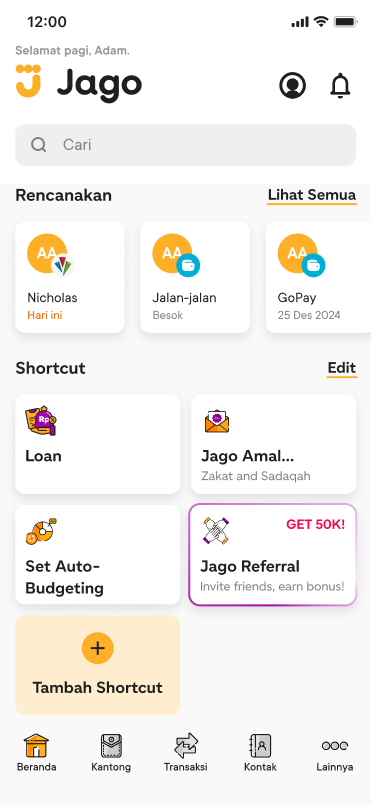
- The nudge appears. Only once, floating above the bottom navigation.
- Tap it and it disappears. It has done its job, so it doesn't stay.
- The screen auto-scrolls down to the Shortcut section.
- Jago Referral is highlighted. A purple border draws itself around it, so it's obvious what to tap next.
Interactive prototype · tap the purple nudge
The nudge floats over the content, close to the thumb, in the same purple as the referral campaign in Spotlight. It is short enough to read at a glance and says exactly what you get.
The screen lands on the Shortcut section, with Jago Referral outlined in purple. The user now knows where referral lives, which matters more than the single tap: next time, they can find it on their own.
Small component, deliberate rules
- 1
Scroll to the entry point instead of opening referral directly
Jumping straight to the referral page would get one tap, once. Scrolling to the shortcut and highlighting it teaches where referral lives, so the nudge keeps paying off after it's gone.
- 2
Show it only once
A nudge that keeps coming back turns into noise people learn to ignore, and it covers part of the home screen. Showing it once keeps it special and keeps the home screen clean.
- 3
Disappear on tap
Once the user has acted, the nudge has nothing more to say. Removing it right away makes room for the scroll and puts all the attention on the highlighted target.
- 4
Use the same purple for the nudge and the highlight
The colour connects the cause and the effect: the purple pill you tapped leads to the purple border you land on, with no need to explain the link in words.
One pattern for anything worth pointing at
Nothing about the nudge is specific to referral. It needs only two things: a short label, and a target on the home screen. That makes it a reusable pattern for other moments when there's a product or feature we want people to notice, without redesigning the home screen each time.
- A new product launchPoint to the new shortcut or card the first time customers open the app after release.
- A feature to highlightLead people to a feature that is easy to miss, using the same tap, scroll and highlight behaviour.
One nudge at a time, each shown once. If several products compete for it, the nudge stops working for all of them.
A small change with a fairly big impact
The nudge made the referral entry point much easier to find, with no new screen and no change to the home screen layout. These are the measures that show its impact:
- Taps on the Jago Referral shortcut, before and after the nudge.
- Nudge tap-through rate. How many people who saw the nudge tapped it.
- Referrals sent, and how many friends went on to open an account.
Sometimes the fix is a signpost
It's tempting to answer "people can't find it" by moving things around. On a busy home screen that only moves the problem somewhere else. A signpost that shows up once, points clearly and then gets out of the way solved the problem without taking space from anything else.
The other win is that the team now has a pattern rather than a one-off fix. The next time something deserves attention, the question isn't where to fit it on the home screen, but whether it's worth the one nudge.
Ideas I set aside
Not every direction made the cut. These were the obvious alternatives, and why they didn't survive.
- Offcut 01
Move referral higher on the home screen
Why it was cut: it pushes something else below the fold, and the same problem comes back for the next feature.
- Offcut 02
Open the referral page straight from the nudge
Why it was cut: it gets one tap, once. Scrolling to the shortcut teaches where referral lives, so people find it again on their own.
- Offcut 03
Show the nudge on every visit
Why it was cut: a nudge that keeps coming back becomes noise people learn to ignore, and it keeps covering the home screen.
Liked this one? Let's talk.
If you're working on something where this kind of thinking would help, I'd love to hear about it.